MidPoint in a Container
Quick Start
Containers are the easiest and the fastest way to start working with midPoint.
If this is the first time you are installing midPoint, see MidPoint Quick Start Guide.
| MidPoint container image is NOT runnable standalone! Database container is requied for midPoint repository persistence, see either Docker Compose or Kubernetes deployment examples for more info. |
If you’re interested in container image naming, particularly in the tagging format, check the Container Images Naming Conventions.
| In June 2026, we changed our image tagging strategy. For legacy tag structure and the recommended changes see Container Image Tagging Changes 2026. |
Benefits of midPoint in a Container
Using containerized midPoint has multiple benefits:
-
Dependency under full control
Containers are created with the required Java version. -
Cloud friendly
Container can be run both locally (e.g. Docker, Podman), and in cloud (e.g. Kubernetes, AWS, Azure, Google Cloud). -
The starting state is guaranteed
You can start the environment in a fully controlled way to support a range of scenarios. -
Pre-configured environment
All elements required to initialize the repository are available. A basic configuration is available and the environment only needs a few configuration steps to run. MidPoint image configuration can be customized to cover most use cases.
|
The image is based on Open Container Initiative (OCI) standards. The installation documentation is focused on using midPoint in Docker or vanilla Kubernetes. You can use any other OCI compatible environment. While the installation instructions will still apply, you may need to customize your environment configuration. |
Deployment Schema
For its operation, midPoint requires a persistent repository, by default we use PostgreSQL database, which is called Native repository. This is supported out of the box if you use our Docker Compose.
The schema has to be initialized in advance which is also handled by the provided Docker Compose file. Once a correct schema version is ready, midPoint checks the initial object (content) and pushes it if necessary.
|
A generic repository implementation, which also covers other than PostgreSQL databases, is available. However, this repository schema is deprecated. Its feature set is limited, and no new features are available for this repository schema. If you are using this repository schema for historic reasons, we strongly recommend to migrate to the Native repository. The availability of the deprecated generic repository schema may require an active subscription. |
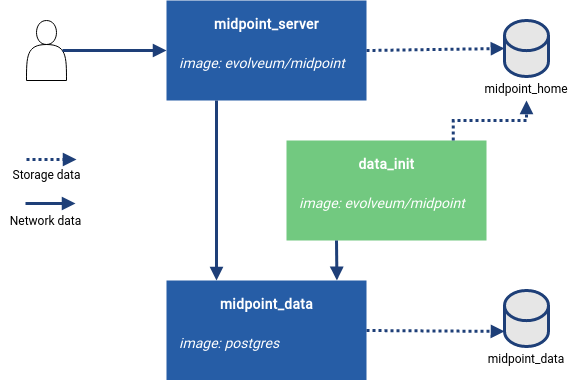
Figure 1. Schema of a containerized environment (basic setup)
In a basic setup, 3 containers are needed.
-
A midPoint instance (midpoint_server)
Once the environment is ready, midPoint can be started.Image: evolveum/midpoint
Tag: <released midPoint version number><base OS>, for example 4.10.3-alpine. -
Initialization of the environment (data_init)
This container handles all requirements for the environment. These need to be prepared before the midPoint instance starts.The initialization image version has to match the midPoint container version to ensure the correct definition is used.
-
Repository init (Network data)
The process uses a ninja application to connect to the database as a client. If needed, the repository structure (schema) is created. -
Configuration init (Storage data)
The process uses a ninja application to prepare the basic native repository configuration. All additional information, such as the DB URI, is updated at a later point via environment variables in the container.In a complex installation, the initialization phase can be skipped by design. The environment would then be initialized separately as an explicit process during the build of the environment.
The provided configuration assumes that the environment is prepared directly during the first run.
-
-
Repository (midpoint_data)
For the repository, you only need a running instance of a PostgreSQL server that can connect from the midPoint container. Everything else is handled by the client side of the connection.Image: postgres
Tag: <PostgreSQL version number><base OS>, for example 16-alpine. See the release notes for the recommended version of PostgreSQL.
For more information, refer to:
Build the Container
We build the images in our Jenkins infrastructure. After some basic tests, in which we make sure, for example, that the environment can be started, we push the tested images to the public Docker Hub repository. All the necessary resources for the Docker image build are publicly available, as well as our other resources, on GitHub.
See Also
Was this page helpful?
YES
NO
Thanks for your feedback